The whole trade in one system
From the clock purchase in the morning to the Z report at night: seventeen areas that share one stock, one price and one customer.
185 functions
- 149 run inside Stemkeep
- 36 connectors, ready to connect
Every function below is built and tested. The 36 connectors to outside services are switched on with your own account the day you need them.
Sales
Sell straight from the lot. The desk shows price, margin and the last price to this customer before you confirm, and two sellers can never sell the same stems.
- Margin per lot before the sale, price changes need a reason
- Lot reserved per order line, first-expiring first or the lot you pick
- Orders from the desk, the web shop, standing orders, quotes, the van and electronic messages land in one flow
-
Quotes and contracts
Approval below your margin floor, a PDF with an accept link for the customer, contract prices with fulfilment.
-
Price rules with ageing steps
Rules by product group, customer, price group, grade and weekday. Older lots step down by themselves, and every line explains its price.
-
Offer lists by e-mail
Today's sellable lots at each customer's own price, as PDF, XLSX or CSV, sent on a schedule. Customers order from the mail without logging in.
-
Your desk, your layout
Layouts per workstation and per person: counter, delivery, export or buying. Panels show open invoices, payment behaviour and the customer's week.
-
Customer article codes
Search by the customer's own code at the desk and the till; the code is printed on delivery note, invoice and quote.
-
Commissions and order changes
Commission lines per customer and product group. Substitute a product or move the delivery day with a reason, also after the plan is out.
Purchasing
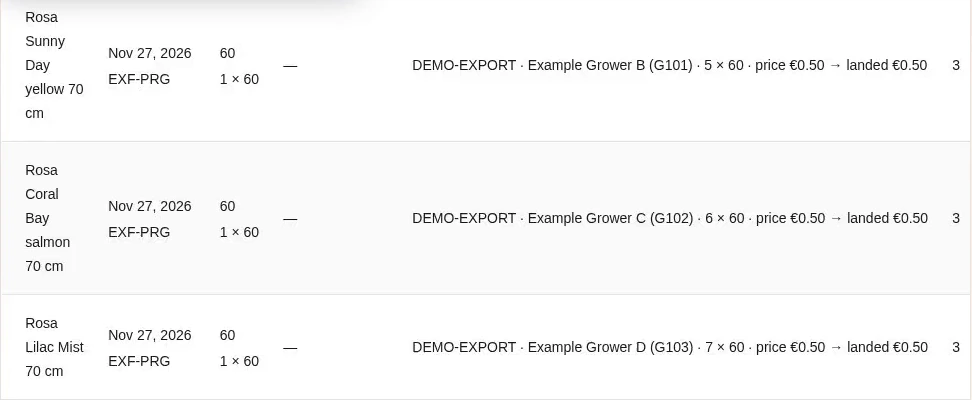
See every grower's offer next to the others with the landed cost per stem, and let the system work out what is missing for tomorrow.
- Pre-orders and standing orders become one draft order per supplier and day
- Fresh stock and goods on the way are subtracted first
- Growers' .xlsx stock lists read as they come
-
Auction clock purchases
Clock purchase files read into goods-in as lots, the clock barcode linked to the lot.
Connector ready -
Floriday buying
Supply lines and clock pre-sale on the buying screen next to other offers; orders out, statuses back.
Connector ready -
Growers' systems
VMP stock links, QUOTES and EOS messages, FloraXchange, OFA, Komet and FloraNow, each checked against the published format.
Connector ready -
Buy back from offers
What you sell from a supplier's offer becomes a pre-order, and the whole boxes are bought at once or every five minutes.
Supplier portal
Your growers log in, confirm or change your orders with a reason, and register what they send. You stop chasing them by phone.
- Invited accounts, full or read only, with a login log
- Reminders before the confirm-by deadline and before arrival
- Confirmed orders show up as expected goods-in
-
Availability becomes offers
The grower keeps a list in the portal or over the API; each row is published as an offer at once and withdrawn when removed.
-
Despatch with costs and box labels
Batches and boxes per despatch, freight and fees into the landed cost, box labels with barcode printed by the grower.
-
Consignment
Cost only at sale. Received, sold, written off and returned per lot, settled per period with a PDF the grower can see.
-
Supplier insights
Share of lines with a difference, claimed and credited value, open and overdue claims. Supplier invoices checked against goods-in.
Stock and lots
Every lot is followed from goods-in to the van: where it stands, how old it is, what it cost and who bought it.
- Vase life, sell-by and write-off day per lot, with ageing discounts
- Trace forwards and backwards as a PDF
- Scan screens for goods-in, moves, counts and picking on any phone or scanner
-
Places inside places
Hall, cold store, shelf and compartment, each with a target temperature. External warehouses and transfers between branches with goods in transit.
-
Grading and repacking
Split a lot into child lots per grade or length, repack into other units. Age and cost carry over, waste is written off with a reason.
-
Smart picking
Pick lists follow the route, last stop first, and the walk through the house. Short picks take another lot of the same product; the rest becomes a pre-order.
-
Stock count per place
Count by scan, no stock movement while counting, differences booked only with permission and a reason.
-
Unpacking plan
Per arrival day: which boxes go straight to pre-orders, which over a cross-dock, which to the usual place.
-
RFID at goods-in
Expected tags on the purchase order; the gate marks what arrived and lists the unknown. Drivers for Impinj and Zebra readers.
Connector ready
Logistics
Plan the vans from the day's orders, build the trolleys shelf by shelf, and know who owes you how many trolleys and buckets.
-
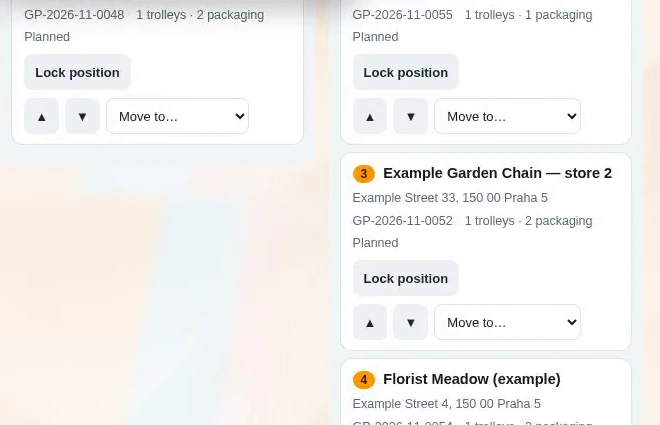
Delivery planning
Regions with cut-off and departure, vans and drivers. Drag stops, publish, and take over late changes with one button.
-
Trolleys and labels
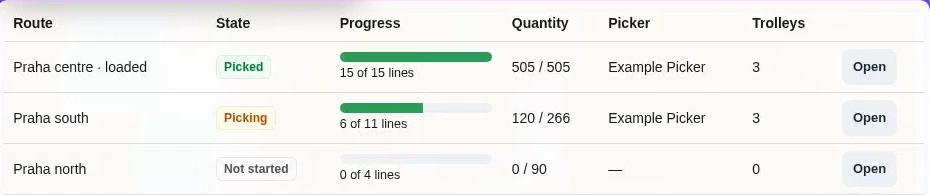
Danish trolleys built by shelf capacity, last stop on trolley one. Trolley and box labels with QR, a trolley board for ready and loaded.
-
Route and loading sheets
Loading list in reverse stop order, cash and packaging on the route sheet, trolley count and van capacity checked per route.
-
Packaging balances
Deposits charged once, returns counted at the till and by the driver, limits per customer. The customer sees his balance in the web shop.
-
Transport prices
Tariffs by customer, carrier, place and number of trolleys, with minimum charge, free-from value, diesel surcharge and VAT per country.
-
Export papers and gates
Phytosanitary requests, Dockservices packing lists, despatch advice and ready-reports, RFID exit gates set to the loading route.
Connector ready
Quality
Check at goods-in, in storage and at dispatch. A failed check stops the booking until someone signs it off with a reason.
-
Checklists where they matter
Per product group, product, supplier or customer, with number limits and required photos. Filled in the office or over the API.
-
Grades A1, A2, B
A delivery graded worse than ordered turns into a supplier claim by itself. Grades also drive the price rules.
-
Complaints in one click
A complaint on the order line with photos ends in a credit note, a replacement or a rejection, and passes on to the supplier in one click.
-
Ready for the auditor
All quality photos on one page, filtered by lot, supplier or period, exported as a PDF report and a ZIP with an index.
Finance
Invoices come out of the orders, payments match themselves, and an order over the credit limit waits for your yes.
-
Invoices and summary invoices
From each order or monthly from the delivery notes, in the customer's currency, with lot, origin and grower under each line, sent by e-mail.
-
Credit notes
From a return or a complaint, or per invoice line, capped per line and always referring to the original invoice.
-
Credit limits that hold
Orders over the limit or with overdue invoices go to an approval queue. Automatic credit checks with an agency are ready to switch on.
-
Bank files
CAMT.053 and MT940 statements matched to invoices, SEPA direct debit with mandates, SEPA payments to suppliers. Daily ECB rates for every currency.
-
Books and accounting
An own double-entry ledger with posting rules and statements if you want the books inside, or exports and an accountant pack by e-mail.
-
Trade settlement and payments
Card payments with refunds, INVOIC messages, Floriday and Ai2 settlement, collections and the Floridata export.
Connector ready
Cash & carry till
A till in the browser that sells from the same lots as the desk. The florist scans, pays and goes; the books are done.
-
Scan anything
Lot labels, EAN, product and VBN codes. The same lot adds to the line; packaging and commission lines come along.
-
Split payments and old invoices
Cash, card, transfer or on account, split as needed. Tick older open invoices and settle them in the same payment.
-
Shifts and Z reports
Opening cash, payouts with a reason, counted cash and the difference, X and Z reports as PDF. Several tills per branch.
-
Keeps selling offline
When the line drops, the till keeps scanning with its own lots and prices and sends each sale once when it is back.
-
Cards, points and vouchers
Customer cards with QR, loyalty points with expiry, vouchers, gift cards and promotions with a report on what they brought in.
-
Card terminal
Drivers for Adyen and Pay. terminals with partial payments and refunds, and an ESC/POS receipt printer. Until connected, the cashier confirms card payments.
Connector ready
Web shop and portal
Your customers order from the stock that is really in your hall, at their own price, in whole packing multiples.
-
Today's offer
Live sellable lots as cards with grade, origin, grower and age; price per stem, bunch and bucket. Sold-out cards disappear.
-
Trolley in the basket
A bar per trolley shows free shelves and the transport cost, counted the same way as the delivery.
-
Delivery day by the rules
Route delivery or pickup, days by region and cut-off, pre-orders of goods still on the way.
-
Brand shops and shop-in-shop
Shops on their own domains from one stock, a page editor with 15 blocks, corners per grower or theme in the same basket.
-
The customer's account
Orders with state and delivery day, delivery notes with the signer, invoices, statement, packaging balance and complaints.
-
Single sign-on and card checkout
Login with Google, Microsoft or any OpenID provider, and card payment in the basket through your payment provider.
Connector ready
Bouquets
From recipe to bouquet lot: the bench sees what to make, and the stems come out of stock at their real cost.
-
Recipes with versions
Components and quantities, labour time, packaging note and photo, allowed substitutes. Draft, valid, retired.
-
Live costing
Material plus labour per bouquet, the margin against your target, and the price for the margin you want.
-
Production board and bench
Planned, in production, done. A tablet screen with one line per component: done in one tap, actual quantity, substitute.
-
Into stock as a new lot
Stems taken first-expiring first, a bouquet lot with real cost and write-off day, undo on the same day.
Analytics and metrics
See where the money is made, down to the lot, without exporting to a spreadsheet first.
-
Sales explorer
Turnover and margin by 13 breakdowns, from product group and colour to grower, customer group, region and channel. Drill from group to article to lot.
-
Against last period and last year
Every figure next to the period before and the same period last year. Saved views, CSV and XLSX export of each table.
-
Stock value and waste
Stock value by lot age, sell-through by day after arrival, waste and shrink by reason and by supplier.
-
Delivery and fill rate
Delivered on time and why not, pre-order and standing order fill rate, packaging balance, forecast accuracy.
-
Management on the phone
Revenue, margin, stems and waste for today, the week and the month; stock by age, open orders, cash in open tills, alerts.
-
Your own BI tool
A read-only BI API with 14 datasets, a Power BI template and a Qlik load script. Scheduled exports with a checksum.
Connector ready
Customer relations
The CRM lives on the customer card, next to his orders and invoices. No second system to keep up to date.
-
Timeline of every touch
Orders, returns, quotes, invoices, payments, complaints, messages and portal sign-ins in one line, newest first.
-
Activities and tasks
Log a call or a visit with its outcome and a follow-up task. My tasks for today, overdue ones in red, a notice when one is due.
-
Pipeline
Opportunities as a list or a board you drag, stages set per company, won or lost with a reason, linked to quotes and orders.
-
Segments and consent
Saved customer filters by region, turnover, last order or product group, exported as CSV. Contacts carry their consent, so mailings go only to those who agreed.
For growers
Turn a branch into a nursery and the grower screens appear: what is planted, what was sprayed, what is cut today and where it goes.
-
Crop plan and treatments
Plots, crops and a weekly plan. Every treatment with its authorisation number; harvest inside the safety period needs a reason.
-
Harvest screen
Big buttons on the handheld: crop, packages, stems, length, grade. A label comes out at once, and it works without internet.
-
Trolley and delivery letters
80 mm and A5 letters per trolley, delivery letters with the plant passport block, VBN codes checked as you type.
-
Offer own lots or planned harvest
Offer what is in stock or what you will cut, without offering the same stems twice across channels.
-
Auction delivery forms
Delivery forms for RFH, Rhein-Maas and Plantion with trolleys and lot letters, built to the Floriday 2026 specification.
Connector ready
Mobile and drivers
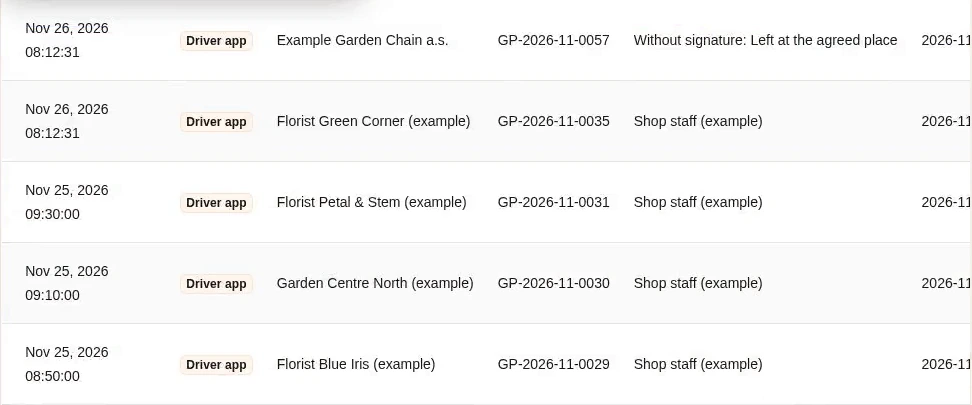
The driver has his route on the phone, collects a signature and photos at the door, and sells from the van.
- Proof with signature, photos and position
- Van sales by card, cash or on account after a credit check
- Offline queue that never writes twice
-
Any phone, any scanner
The handheld screens run in the browser and install like an app. No special hardware to buy.
-
Device management
Enrol a device with a one-time QR code, set its start screen, and lock, sign out or wipe it from the office.
-
Cash-up for drivers
Returns go back into the same lots; the driver's cash is counted in the office at the end of the route.
-
Store apps
iPad and Mac apps are in testing; public App Store and Google Play releases are prepared when you need them.
Connector ready
Integrations
Every trade connection is built to the published specification and tested on sample files. We switch it on with your account when you need it.
-
Floriday and Floricode
Offers, orders and statuses with retries and an outbox; Floricode code lists synced with only the changes after the first run.
Connector ready -
EDI
EDIFACT ORDERS, ORDRSP, DESADV and INVOIC over SFTP, AS2, HTTPS or Compacer, each file processed once.
Connector ready -
Marketplaces
Floranow and Plantform both ways: your stock out as offers, their orders in as sales orders with confirmations back.
Connector ready -
SMS, WhatsApp and outside CRM
Customer messages and pay links through CM.com; customers, contacts and deals synced with HubSpot or Salesforce.
Connector ready -
Open API and webhooks
A REST API with rights per call, a public OpenAPI 3.1 description, a sandbox company with demo data, signed webhooks with retries.
-
Partner apps
A catalogue of partner apps with their permissions explained in words. Install, pause, rotate keys or uninstall in a click.
Platform
Your company runs in its own database, in your staff's own languages, and keeps its history with no time limit.
-
19 languages per user
Each person picks a language, with date and number formats to match. Every screen is complete, guarded by a test.
-
Branches and legal entities
Each branch belongs to a legal entity with its own document series, bank accounts and VAT registrations.
-
Roles and audit log
An access matrix per section; every change recorded with who, when, through which channel, and what it was before.
-
Your own fields and tabs
Add registers, fields and print templates without code. Save filters as tabs above any list, with your columns remembered.
-
Printing without dialogs
A small local print agent sends each document kind to its printer and tray, and finds network label printers itself.
-
Help and Academy
A ? on every flower screen opens its guide. Courses per role with guided tours over the real screens, short tests and videos.
AI and forecasting
Forecasts and price advice you can check: every number shows the model it came from and its error.
-
Demand forecast
Per product group the best of four models, chosen by back-test, with the flower peaks learned from your own history.
-
Price advice per lot
Proposals from sell-through and age, applied to today's price list with the reason on each line.
-
Reads your paperwork
Delivery notes, supplier invoices, order sheets and complaint e-mails read line by line; incoming mail sorted by kind.
-
Assistant and trade matching
Ask about stock, a customer's price or today's arrivals; the assistant only reads, within your rights (Czech only for now). Slow lots get proposed buyers.