A portal your growers will use
For wholesalers who buy from growers, and for houses that grow part of their own range. Growers confirm orders, post availability and label their boxes in their own portal. Your own nursery harvests, labels and offers from a touchscreen.
- Supply offers
- Order confirmations
- Box labels
- Consignment
- Harvest lots
- Safety periods
- VBN codes
Where buying from growers goes wrong
The back-and-forth that eats a buyer's afternoon, and what Stemkeep puts in its place.
-
Did the grower confirm?
Growers confirm your purchase order in the portal with their own reference, or change a line with a reason. You accept or decline the change.
-
Availability sent as a spreadsheet
Growers keep an availability list in the portal or send it over the API. It appears at once as offers on your buying screen, and a removed row withdraws the offer.
-
Boxes nobody can match at goods-in
Growers register their despatch with batches and boxes and print box labels with a barcode from the portal. The despatch becomes your expected delivery.
-
Freight that disappears from the cost
Freight and fees on the despatch go into the landed cost of the lots, converted at the exchange rate of the despatch day.
-
Late deliveries found at the dock
Reminders go out before the confirm-by deadline and when no despatch is registered before arrival. One screen lists every order still waiting for a supplier.
-
Consignment counted by hand
Consignment lots carry a cost only when they sell. Settle per period and currency with a PDF; the grower sees a read-only report in the portal.
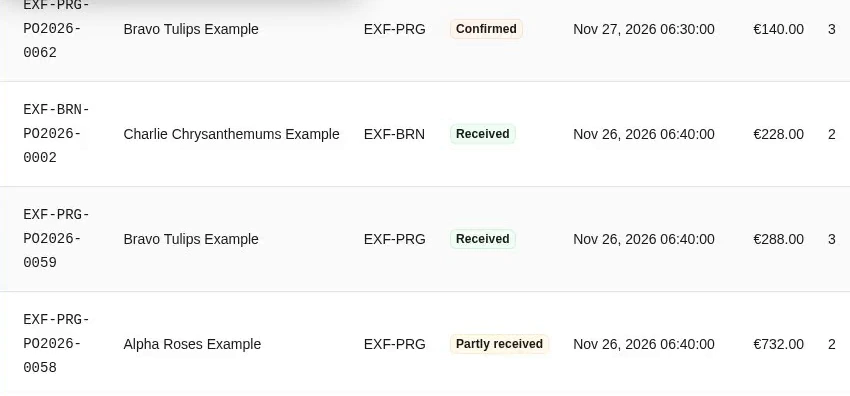
Every order to a grower, with its state
Draft, sent, confirmed, partly received, received: each purchase order shows where it stands. Confirmed orders wait in expected deliveries, and the late ones rise to the top.
- One draft order per supplier, currency and day
- Sent by portal, message or e-mail
- Supplier invoice checked against what came in
- Claims at the grower with a credit deadline
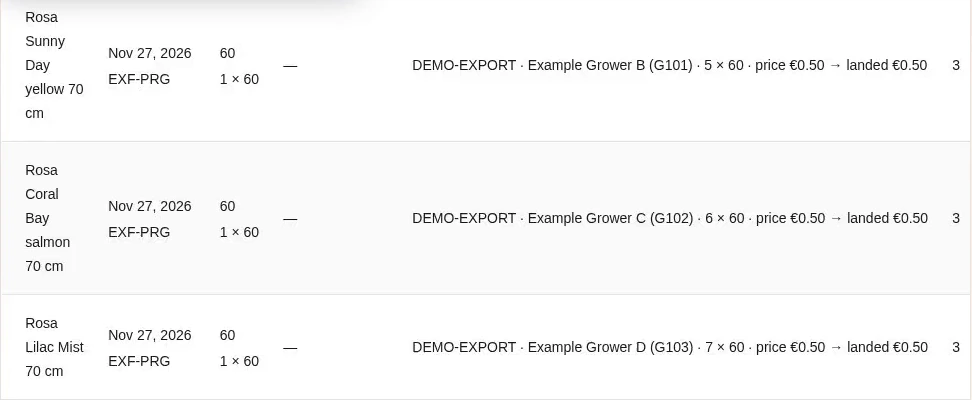
Growers' offers side by side
Availability from the portal, imported offer lists and supply from partners land on one buying screen, with the landed cost per stem.
- Portal availability published as offers at once
- Excel offers and stock lists read in directly
- The cheapest offer picked in the purchase proposals
- Grower on Stemkeep too: your order becomes their sales order, lot reserved
One order, from offer to settlement
The grower and the buyer work on the same record, so nobody retypes a delivery.
Offer
The grower publishes what is available in the portal.
Order
Your buyer orders. The grower confirms, or changes a line and gives a reason.
Despatch
Batches and boxes are registered and the box labels printed.
Receive
Goods-in scans the boxes against the expected delivery and books them as lots.
Settle
The supplier invoice is checked against goods-in; consignment is settled per period.
For your own production
When you grow as well as trade, the nursery works in the same system as the warehouse.
-
Harvest touchscreen
Big buttons for crop, packages, bunches, stems, length and grade. Each harvest becomes a lot with a cost per stem, and its label prints at once.
-
Crop planning and spray register
Plots and crops with harvest windows, and a treatment register with authorisation number and active substance. Harvest inside a safety period needs a reason.
-
Harvest forecast
Expected harvest per crop and week, plan against actual four weeks back and ahead, and planned harvest offered before it is cut.
-
Photos at harvest
A phone photo at harvest goes to the catalogue in one tick, cropped to 4:3 with your watermark.
-
Delivery letters
Print-ready PDFs at 80 mm with one trolley per page, or A5 with a QR code, including the plant passport block.
-
VBN codes checked as you type
Search code lists by code or name in any language. Unknown or expired VBN codes are blocked, packaging codes get a warning.
-
Works without internet
Harvest screens open without a connection, labels get their final lot numbers from reserved numbers, and the queue is sent once when the line is back.
-
Auction delivery forms
Electronic delivery forms for Royal FloraHolland, Veiling Rhein-Maas and Plantion, built from your own lots, with trolleys of 24 packages and a paper form as fallback.
Connector ready
Who works on the grower side
Growers get a portal, your people get their own screens. Everyone sees the same order.
-
Buyer
Sends orders, compares offers, accepts or declines the grower's changes.
Buying screen
-
Grower's office
Confirms orders, keeps availability up to date and registers despatches.
Grower portal in any browser
-
Harvest team
Books the harvest and prints the labels on the spot.
Harvest touchscreen
-
Goods-in
Scans boxes against the expected delivery, grades and takes photos.
Intake tablet
-
Office
Checks supplier invoices, settles consignment and follows up claims.
Office screens
Questions about growers
What does a grower need to use the portal?
A browser and an e-mail invitation. They sign in with a one-time link and see only their own orders. You choose full or read-only access for each account, and every login is logged.
Can a grower connect their own system?
Yes, through the supplier API with separate rights for reading and writing. When the grower also runs Stemkeep, the two companies link directly and orders pass from one to the other.
Is the Floriday link for growers live?
The Floriday grower link and the auction delivery forms are built and ready to connect. We switch them on and test them live with your account.