From the clock to the florist's door
For wholesalers who buy from growers and at the clock, and deliver to florists. Every stem sits in a lot with its grower, age and landed cost, from the purchase to the signed delivery.
- Clock purchases
- Grower offers
- Lots and FEFO
- Customer prices
- Pick lists per route
- Danish trolleys
- Packaging balances
Where a wholesale day goes wrong
Six moments that cost money in a normal week, and what Stemkeep does about each of them.
-
The same bunch sold twice
Each order line reserves its lot as soon as it is saved. The desk, the webshop and the till all see stock minus what is reserved, so nobody sells what is already gone.
-
Old stems stay at the back
Every lot carries its arrival date, vase life and write-off day. Picking takes the oldest first, and ageing steps lower the price as a lot gets older.
-
A price nobody can explain
Prices come from rules by customer, price group, product group, grade and weekday, with a minimum margin. Every order line shows which rule set its price.
-
Margin you see at month end
The desk shows the margin per lot for this customer before the order is confirmed, from the landed cost per stem with freight and fees.
-
Buying on gut feeling
Purchase proposals add up pre-orders and standing orders, subtract fresh stock and goods on the way, and make one draft order per supplier and day.
-
Trolleys loaded the wrong way round
Pick lists follow the walk through the warehouse, last stop first. Trolley 1 carries the last stop, so the driver never has to dig.
Buy from every source on one screen
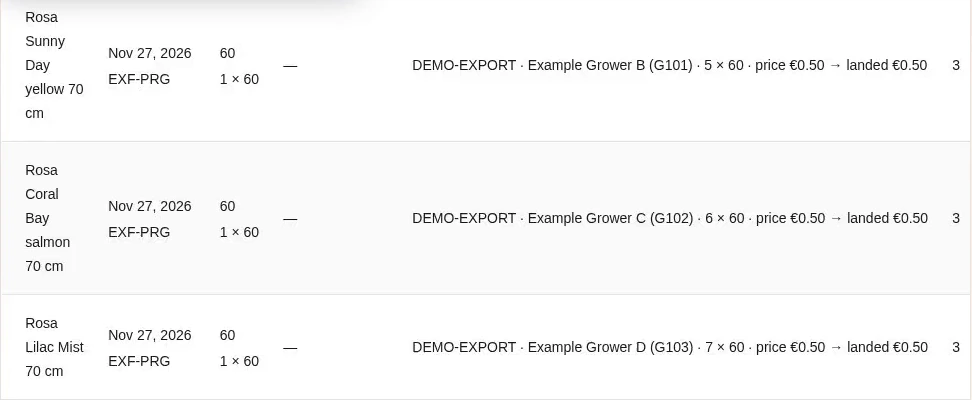
Grower offers, supply lists and your clock buy list sit side by side with the landed cost per stem. Pick the best one and the order goes out by portal, message or e-mail.
- Offers from several growers per product and stem length
- Landed cost with freight, fees and currency
- Purchase proposals from pre-orders and standing orders
- Clock purchases read in as lots (connector ready)
Sell the way florists order
Orders come in by phone, webshop, offer e-mail and standing order. They all land in the same sales flow, at each customer's own price.
-
Offer lists by e-mail
Send today's sellable lots at each customer's price as PDF, Excel or CSV. Florists order straight from the e-mail, without logging in.
-
Webshop with live lots
Florists see grade, grower, origin and what is left, at their price per stem, bunch or bucket, and pick a delivery moment before the cut-off.
-
Standing orders and pre-orders
Weekly orders create themselves. Pre-orders receive the goods that came in overnight in the morning distribution, before the desk opens.
-
Claims with photos
A complaint sits on the order line with its photos. Credit note, replacement or rejection in one step, and a claim at the grower in one click.
-
Customer history and CRM
Timeline, activities, tasks, pipeline and segments, next to the customer's revenue, open invoices and payment behaviour.
-
Sales and stock figures
Explore sales by 13 breakdowns and drill down from product group to article to lot. Stock value and waste sit next to it, and every view exports.
Pick by route, load by stop
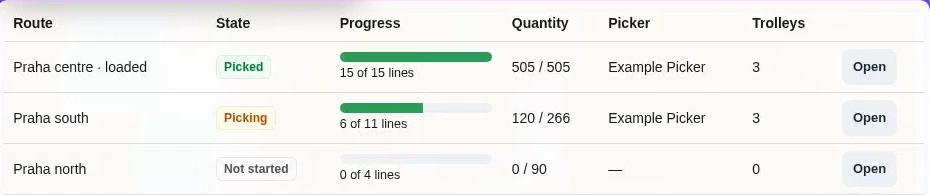
Every route has its own pick list. Pickers confirm line by line with the scanner; a short pick takes another lot of the same product or becomes a pre-order.
- Lists per route and for pickup at the branch
- Short pick with a reason, damaged stems written off
- Trolleys built by shelf capacity, labels with QR code
- Undo until the trolley is ready
Signed at the door, invoiced the same day
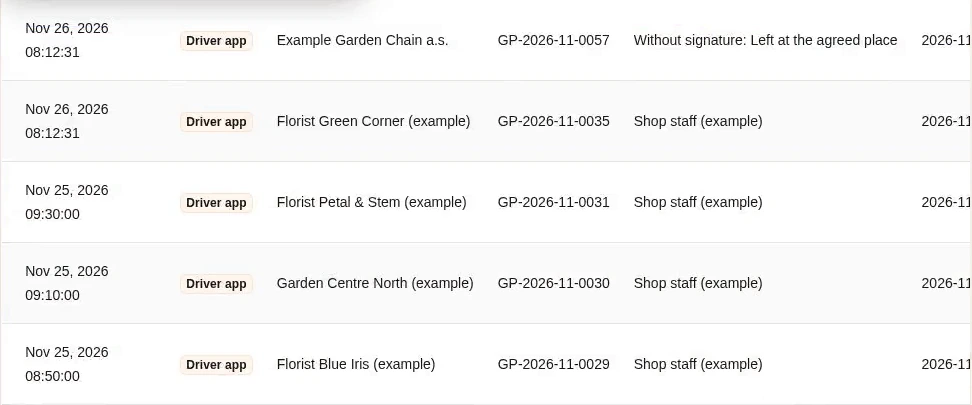
Drivers follow the route in driving order on the handheld. Each stop is signed or photographed, packaging is counted, and the invoice leaves when the order ships.
- Proof with signature, photos and position
- A message to the customer when the van runs late
- Packaging ledger per customer, with deposits
- Invoices sent by e-mail automatically
One day in the house
The same lots move through every step, so nobody types anything twice.
Buy
Purchase proposals show what is missing for tomorrow. Approve them and the orders go to the growers.
Receive
Deliveries are checked on the tablet, graded and booked once into lots, each with its place in the cold store.
Sell
Pre-orders get their goods first. The desk and the webshop sell from the lots at each customer's price.
Pick and load
Pick lists per route, trolleys packed by stop, the van checked for space before it is loaded.
Deliver and invoice
Drivers sign off every stop, invoices go out and packaging balances update.
Everyone works on the same lots
Each role has its own screen, on the device it actually uses.
-
Buyer
Compares grower offers and the clock buy list with landed cost, and approves the purchase proposals.
Buying screen
-
Sales desk
Takes orders by phone and e-mail, sees margin and stock per lot, sends the offer lists.
Sales desk
-
Order picker
Works through the pick list with the scanner and packs the trolleys stop by stop.
Handheld or tablet
-
Driver
Drives the stops in order, collects signatures and photos, counts packaging and cash.
Driver app on the handheld
-
Office
Watches credit limits, sends invoices and credit notes, follows up open items.
Office screens
-
Owner
Follows revenue, margin, stems and waste for today, the week and the month.
Management page on the phone
Questions from wholesalers
Can we keep buying through Floriday and the clock?
Yes. The Floriday buying link and the clock purchase reader are built and ready to connect. We switch them on and test them live with your account when you start.
Do our florists have to change how they order?
No. Phone and e-mail orders go through the sales desk as they do today. The webshop and the offer e-mails are an extra channel, at each florist's own price.
Can we start with one branch?
Yes. Each branch has its own stock places, tills and routes. Start with one and move the others when they are ready.